You protect hard-delete. A Conditional Access policy tied to an authentication context, so a soft-deleted user can’t be purged out of the recycle bin. Targeted at your users, like every guide shows. You test it — blocked. Good.
Then, to be thorough, you try it as an application: a service principal with permission to delete users, calling Microsoft Graph directly. 403 Forbidden. Blocked there too. So applications are covered as well.
They aren’t — and that 403 is what puts you on the wrong path. It isn’t your policy doing its job. It’s the client not knowing how to answer a claims challenge. Give the app what it’s missing — the authentication context in its token request — and the same service principal purges the user. 204. Gone.
A Conditional Access policy targeted at users never evaluates for a service principal. You locked the door, the error message told you the application entrance was locked too, and it was standing open the whole time. This post is about actually closing it.
Everything below was tested against a live tenant with curl and PowerShell against the Microsoft Graph API. You can reproduce all of it.
TL;DR
- The
403an app gets isn’t your policy — it’s a client-capability gate. Hand the app the auth-context claim and it purges the user anyway.- A user-scoped policy never evaluates for a service principal. Covering apps needs a second,
clientApplications-scoped policy — beta endpoint only, and no group targeting.- For a workload identity there’s no step-up, so a grant control does nothing. Only block works.
User.ReadWrite.Allpurges users — not just the purpose-builtUser.DeleteRestore.All. And User Administrator purges them while its own role definition says it can’t.- Managed identities skip the whole thing: same code,
403for an app registration,204for a managed identity.- Delegated access is fine — the user policy fires. The hole is app-only permissions and managed identities.
What a protected action actually is
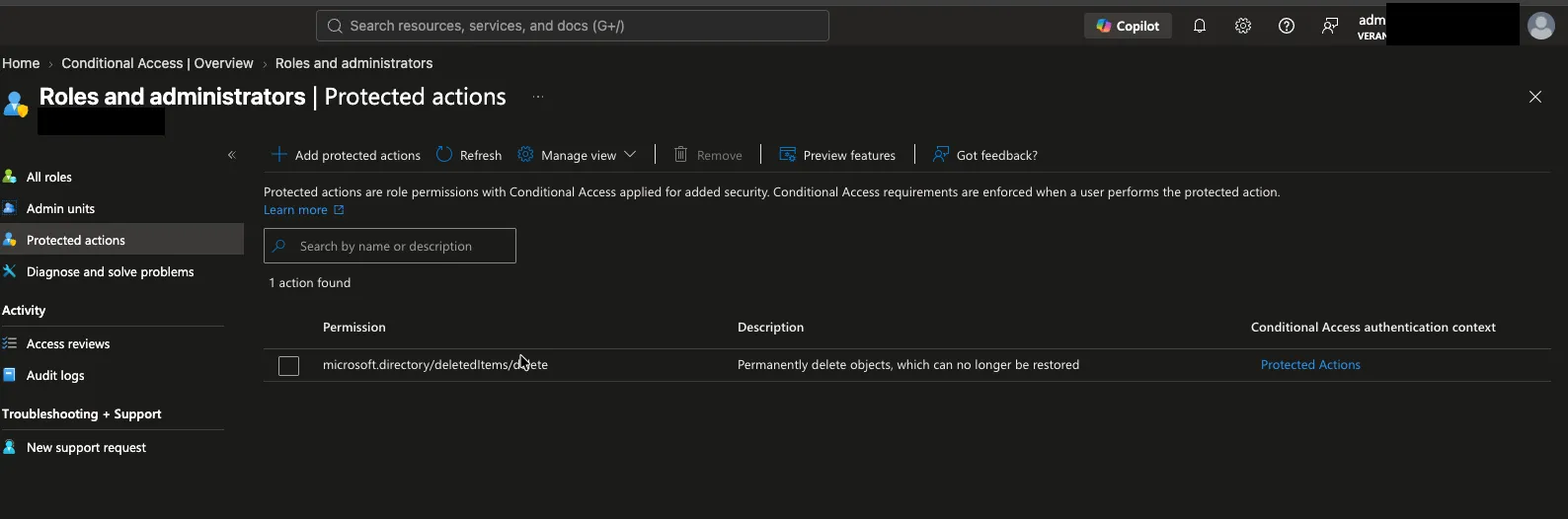
A protected action binds a Conditional Access authentication context to a specific directory action, rather than to an app or a sign-in. The classic one, and the one I’m using here, is the permanent-delete verb:
microsoft.directory/deletedItems/deleteThat’s the “purge” — emptying a soft-deleted object out of the recycle bin so it can’t be restored. It’s the button an attacker reaches for after deleting things, and therefore a natural anti-ransomware control for the directory itself.
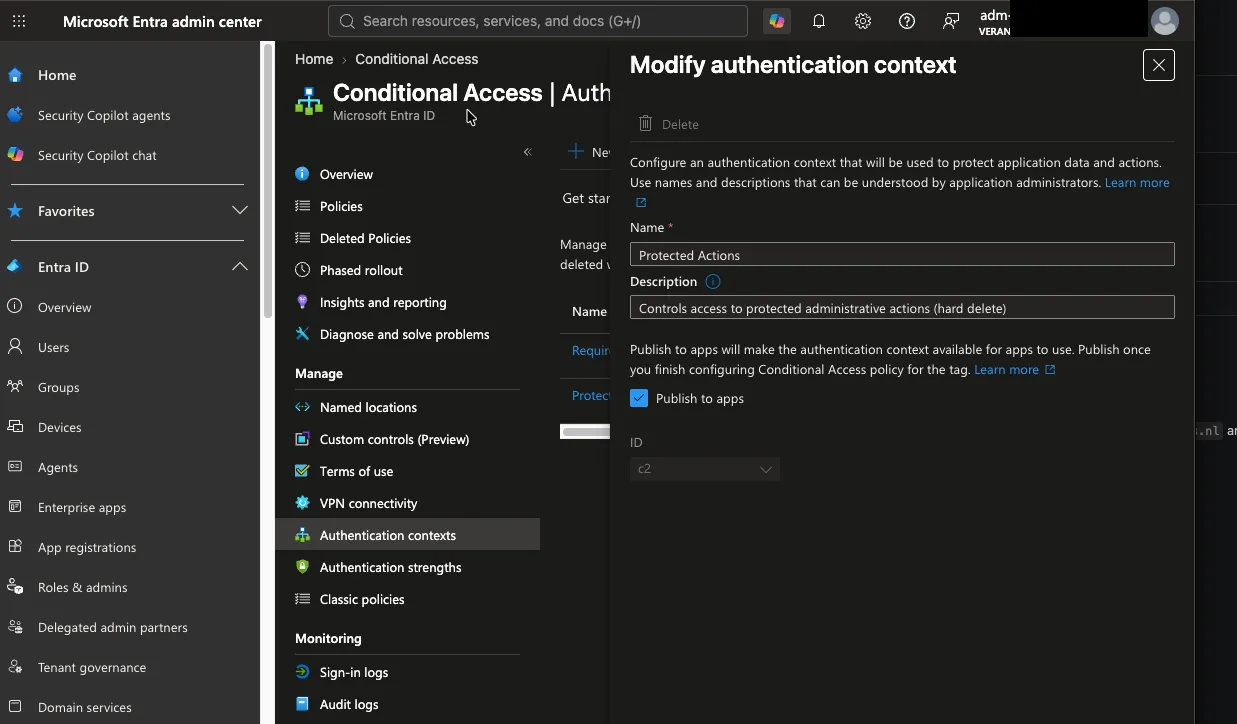
You tag that action with an authentication context (mine is c2), then a CA policy references the context. Enforcement happens the moment the action is attempted, against the state of the calling token — not at sign-in.

The mechanism underneath is a single claim. The action demands that the token carry acrs (Authentication Context Class Reference) containing the context id. Whether a caller can obtain that claim decides everything that follows.
Here’s the binding in the portal — the hard-delete action tagged with authentication context c2:
And the authentication context itself, published and available:
The setup
Nothing exotic. In a test tenant I had:
| Piece | Value |
|---|---|
| Protected action | microsoft.directory/deletedItems/delete → auth context c2 |
| User policy | users: All, block, referencing c2, zero exclusions |
| Test app | app registration + secret, User.ReadWrite.All + User.DeleteRestore.All |
| Test objects | throwaway users: create → soft-delete → attempt purge |
| Client | plain curl (doesn’t do claims challenges unless told to) |
The user policy is the important one. It’s what every guide tells you to build, and it looks like complete coverage. It isn’t — user conditions do not apply to workload identities, so an app calling the protected action is governed by something else entirely. Here is what that something else does.
Three doors
I ran the same purge across the two variables that matter: does the client speak the claims-challenge protocol (cp1), and is there a workload-identity policy blocking the service principal. That collapses to three outcomes — three doors.
Door 1 — a plain client, no policy in sight
App holds User.DeleteRestore.All and calls the purge with an ordinary token. To take policy off the table entirely, I disabled every CA policy referencing c2 first, and verified they were off.
DELETE /directory/deletedItems/{id}

HTTP/1.1 403 Forbidden
Authorization_RequestDenied
"Operation requires conditional access and client does not support it.
 Client must be configured to support conditional access claims challenges to proceed."
No policy was consulted. The block comes purely from the action being tagged with an authentication context and the client not speaking the protocol to satisfy it — a capability gate, not policy evaluation. No exclusion can rescue it, because there’s no policy to exclude anyone from. That takes out any app-only client without cp1: a lot of default SDK setups, and plenty of automation you already run.
To prove it was the tag and nothing else: I unbound c2 from the action, left both policies untouched, and the identical request returned 204. Rebound it, and the block came back.
Door 2 — a capable client gets a real challenge
To play the game, the client advertises the cp1 capability in its token request:
claims={"access_token":{"xms_cc":{"values":["cp1"]}}}Now the same purge returns a proper challenge instead of a flat refusal:
HTTP/1.1 401 Unauthorized
WWW-Authenticate: Bearer error="insufficient_claims",
  claims="eyJhY2Nlc3NfdG9rZW4iOnsiYWNycyI6eyJlc3NlbnRpYWwiOnRydWUsInZhbHVlcyI6WyJjMiJdfX19"

Authorization_ConditionalAccessRequired
Base64-decode that claims blob and it’s asking for exactly what you’d expect:
{ "access_token": { "acrs": { "essential": true, "values": ["c2"] } } }“Come back with c2 in your token.”
Door 3 — satisfy the challenge
Re-request the token, this time also asking for the acrs claim:
claims={"access_token":{"xms_cc":{"values":["cp1"]},"acrs":{"essential":true,"values":["c2"]}}}With no policy blocking, Entra puts c2 in the token (acrs: ["c2","pfdr"]) and the purge returns 204. Gone.
Now switch the workload policy on — a policy scoped to this service principal, blocking on c2 — and re-request that same token:
AADSTS53003: Access has been blocked by Conditional Access policies.No token is issued at all. The identity can’t even obtain a credential capable of performing the action. That’s a stronger outcome than a resource-level denial, and it’s the one you actually want.
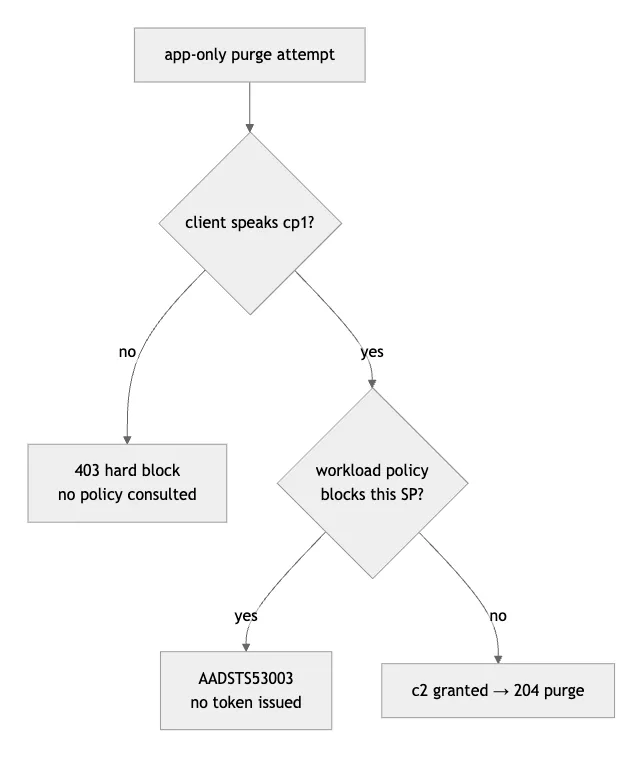
The part that trips people up
Look at Door 3 again. For an app-only identity there is no MFA prompt, no phishing-resistant step-up, no device check. It’s a client-credentials flow — there’s nobody to prompt. So the claim is never earned. It is either not refused (no policy blocks you, Entra hands you c2) or refused (a policy blocks you, you get nothing).
Which means, for a workload identity, a CA policy with a grant control grants nothing. You can’t step up into a claim you were always going to be handed anyway. The only control that does anything to a service principal is block. If you build a workload-identity policy with a grant requirement expecting a service principal to “satisfy” it, you’ve built a no-op.
Delegated is fine, actually
“The user can just go through an app instead” is only half true, and the wrong half is the one people worry about.
I set up an app with delegated User.DeleteRestore.All, signed in as a user who holds the right role, and asked for the auth context at sign-in:
claims={"access_token":{"acrs":{"essential":true,"values":["c2"]}}}The sign-in came back blocked:
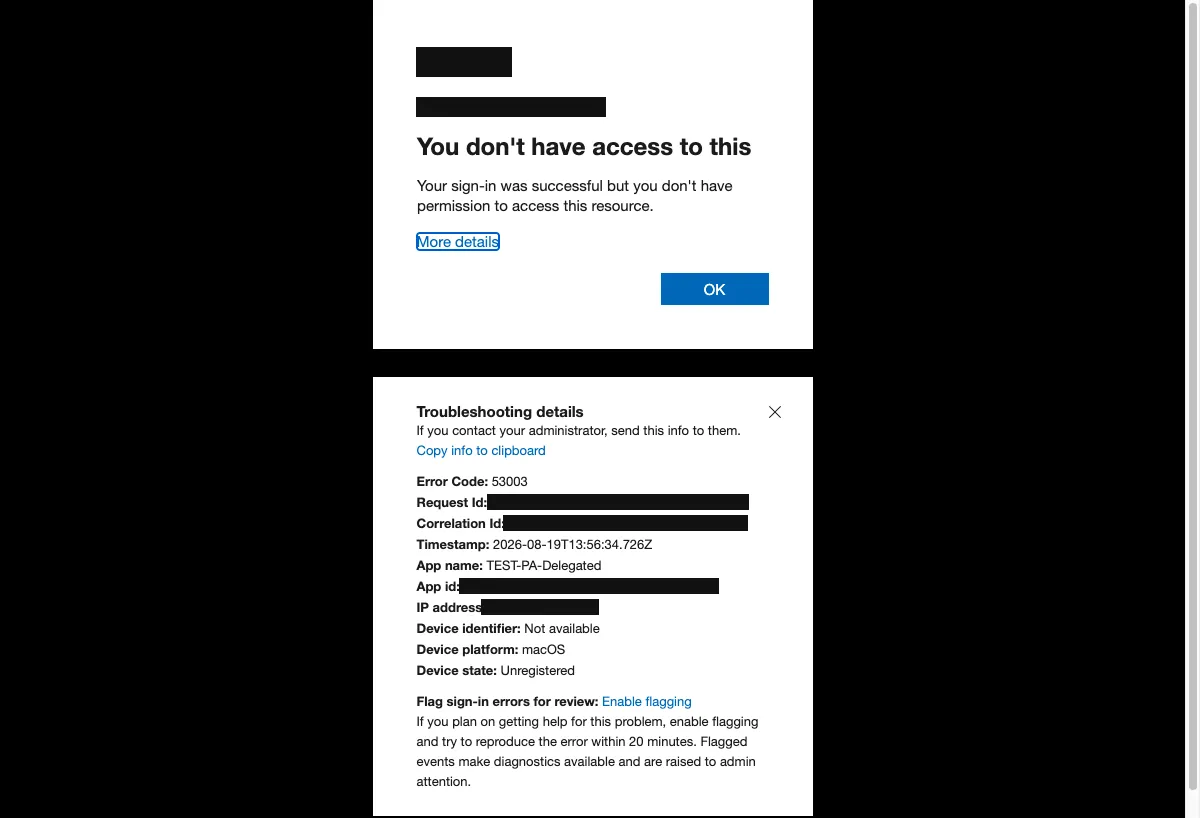
53003 — sign-in successful, but the access policy does not allow token issuance. The user-scoped policy caught it. A delegated call carries a user in the token, so the user policy evaluates and blocks the step-up. The user can never get a token carrying c2, so they can never perform the action.
The full delegated behaviour mirrors app-only exactly, and the capability gate is identical — no cp1, hard 403; cp1 without c2, a 401 challenge; request c2, blocked by the user policy. One detail worth knowing if you reproduce it: in the authorization-code flow, cp1 has to be declared in the token request, not the authorize request. Put it in the wrong step and you’ll chase a phantom 403.
So the honest picture is tighter than “any app bypasses it”:
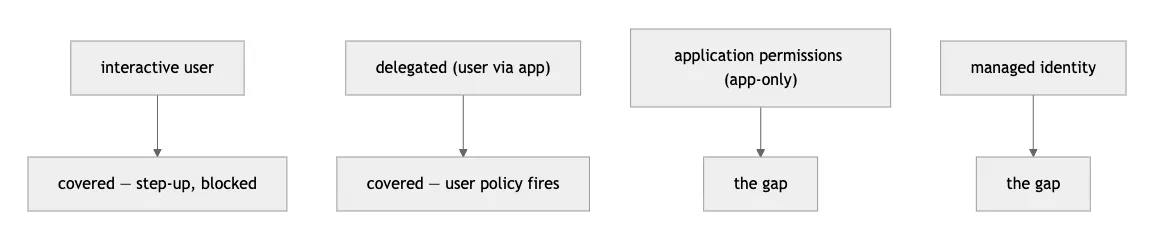
The moment a human is in the loop — portal or delegated — the protected action holds. The hole is the callers with no user to challenge: app-only application permissions, and managed identities.
Managed identities: outside the fence entirely
Give a managed identity the same Graph app roles and run the same sequence. Where the app registration with an identical permission gets 403, the managed identity gets 204.
The reason is documented, just never in this context: managed identities aren’t covered by Conditional Access. The token they pull never carries c2, never advertises cp1, and the authentication-context requirement is skipped, not failed. Protected-action enforcement inherits that exemption.
That’s a legitimate design lever — if you have automation that genuinely must be able to purge, a managed identity is the supported way to keep it running while an app registration would be permanently blocked. It is also, simultaneously, the gap. Nothing about a protected action will protect you from a managed identity that holds the permission. The only control left is grant hygiene: don’t give it the permission.
Now find every workload identity that can do this
This is where it stops being a curiosity and starts being work, because you can’t cover what you can’t enumerate — and for workload identities the policy only lets you select specific service principals, or all of them. No groups. (A CA policy assigned to a group that contains a service principal simply isn’t enforced for it — one of those limitations you find out about the hard way.)
So you need an accurate list of the service principals that can purge a user. There are two routes to that capability, and they look nothing alike.
Route one: a Graph application permission. Two of them grant the purge. User.DeleteRestore.All is the purpose-built one, and it’s the only permission Microsoft’s docs list for permanent-delete. But User.ReadWrite.All grants it too — I verified it, 204 and the object gone — and that’s the one that matters, because User.ReadWrite.All is broad and consented all over the place. An audit that only looks for User.DeleteRestore.All misses every app holding the far more common User.ReadWrite.All.
Route two: a directory role — and this one hides. A service principal holding User Administrator, with no Graph permissions at all, permanently deleted a user in my tests. 204, object confirmed gone.
That shouldn’t be surprising until you look at the role definition:
User Administrator → microsoft.directory/deletedItems.users/restore
                     microsoft.directory/users/delete
The definition lists restore, and soft delete. It does not list deletedItems/delete or deletedItems.users/delete — the purge. Yet the role purges. So an inventory built by reading role definitions for the delete action misses it, and an inventory built by listing Graph permission grants misses it too. The capability is real and it’s invisible to both of the obvious audits.
Which means a complete answer to “which of our workload identities can permanently delete a user” has to check both:
Connect-MgGraph -Scopes "Application.Read.All","RoleManagement.Read.Directory"

# route one — Graph permissions that grant the purge (both do; the docs only admit the second)
$graph = Get-MgServicePrincipal -Filter "appId eq '00000003-0000-0000-c000-000000000000'"
$purgePerms = 'User.ReadWrite.All','User.DeleteRestore.All'
$purgeIds = ($graph.AppRoles | Where-Object { $_.Value -in $purgePerms }).Id

Get-MgServicePrincipal -All | ForEach-Object {
  $sp = $_
  Get-MgServicePrincipalAppRoleAssignment -ServicePrincipalId $sp.Id |
    Where-Object { $_.AppRoleId -in $purgeIds } |
    ForEach-Object { $sp.DisplayName }
}

# route two — SPs holding User Administrator (can purge users; the definition doesn't admit it)
$roleId = (Get-MgRoleManagementDirectoryRoleDefinition -Filter "displayName eq 'User Administrator'").Id
Get-MgRoleManagementDirectoryRoleAssignment -Filter "roleDefinitionId eq '$roleId'" -ExpandProperty principal |
  Where-Object { $_.Principal.AdditionalProperties['@odata.type'] -eq '#microsoft.graph.servicePrincipal' } |
  ForEach-Object { $_.Principal.AdditionalProperties.displayName }
Run that, take the service principals it returns, and those are the ones your workload-identity policy has to list explicitly.
Keeping the list honest
A static list rots the moment someone consents a new app or assigns a role. The only version of this that survives contact with a real tenant is a scheduled diff: on a timer, rebuild “service principals that can purge” and compare it to “service principals named in the policy”. Anything in the first set and not the second is drift — alert on it. It’s a handful of lines on top of the queries above, and it’s the difference between a control you configured once and a control that stays true.
Two sharp edges you’ll hit
The binding is invisible without $select. Ask Graph for the resource action plainly and the authenticationContextId property isn’t in the response at all:
GET .../resourceActions/microsoft.directory-deletedItems-delete-delete
→ actionVerb, description, id, isPrivileged, name, resourceScopeId
No authenticationContextId. Add $select=authenticationContextId and it appears — on both beta and v1.0. Any home-grown drift check that does a plain GET will conclude the action is unprotected when it’s fine. That trap cost me a false “our tenant has drifted” alarm before I worked out what was happening.
The workload-identity + auth-context policy is still beta at the API. Conditional Access for workload identities is generally available. Authentication context targeting for users is generally available. But the specific combination — a policy that targets service principals and references an authentication context — is not, at the API level:
POST /v1.0/.../policies   → 1038: contains preview features. Use the Beta endpoint.
GET  /v1.0/.../policies/x → 1037: contains preview features. Use the Beta endpoint to retrieve.
The portal builds it happily, because the portal calls the beta endpoint under the hood. So you can create it in the GUI and see it there, but the stable v1.0 API can’t create it or read it. Manage this policy with tooling that targets v1.0 and it’s invisible — the read comes back 1037, and if your tooling swallows errors, it concludes the policy doesn’t exist. The msgraph provider handles beta, so this isn’t a dead end for infrastructure-as-code; it’s just a sharp edge if any part of your pipeline is still on v1.0.
One more, free of charge: these delete APIs are eventually consistent. A 204 doesn’t mean the object is gone yet — read it back a second later and it may still be in the recycle bin, then vanish a few seconds after. Soft-delete throws 404 right after you create a user. Build any audit or detection on a single synchronous check and it will lie to you. Poll, with retries.
What complete coverage actually needs
Everyone builds step one. A complete protected-action posture for hard-delete needs all four:
- Bind the authentication context to the action. (Verify with
$select.) - A user-scoped CA policy — the one everybody documents.
- A
clientApplications-scoped CA policy, listing the service principals that hold the permission, created on the beta endpoint. Plus the scheduled diff to keep that list current. - Grant hygiene for managed identities, because nothing else will protect them.
Step three is the one nobody shows you. Here’s what it looks like — a Conditional Access policy targeting a workload identity, blocking on the same authentication context:
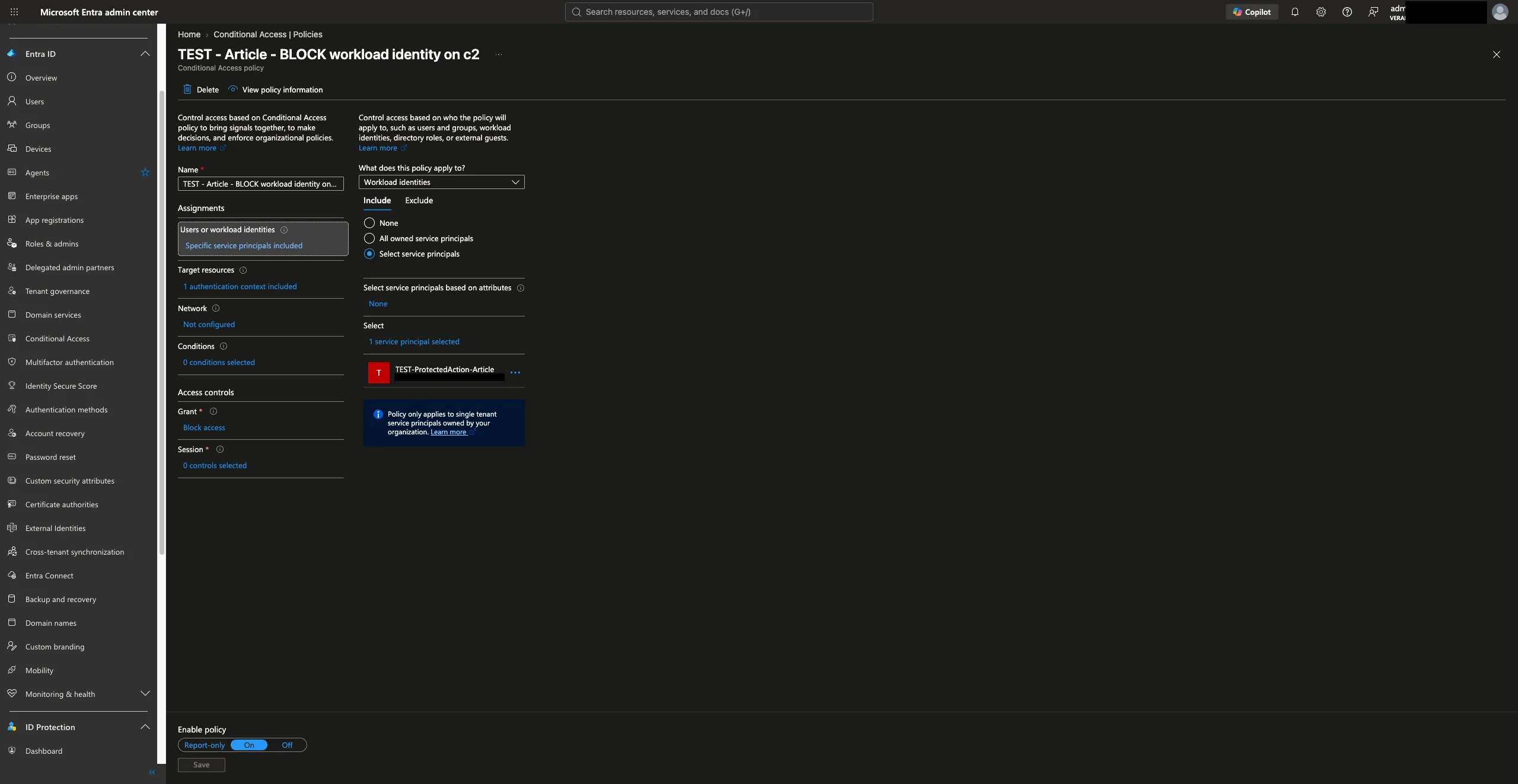
The control isn’t broken. It does exactly what it says. It just says less than most people read into it — it protects the user context, and leaves the application context to a second policy that isn’t in any of the guides. Build that, and your hard-delete is actually locked.
Sources
- What are protected actions in Microsoft Entra ID?
- Add, test, or remove protected actions — including the beta Graph endpoint for binding an authentication context to an action
- Permanently delete item (directory object) — Microsoft Graph
- Working with users in Microsoft Graph — who can perform sensitive actions
- Conditional Access for workload identities
- Claims challenges, claims requests, and client capabilities — the
cp1/xms_ccmechanism - Continuous access evaluation for workload identities
Tested in a lab tenant against live Microsoft Graph. Tenant identifiers, object IDs and account names are placeholders or removed. Protected actions and workload-identity authentication-context policies were in preview at the time of writing; behaviour may change.