You put your Tier-0 groups, admin accounts and applications (the app registration and its service principal) in a Restricted Management Administrative Unit. A tenant-wide Groups Administrator gets a 403. A service principal holding Application.ReadWrite.All gets a 403. Good. That’s the point.
Then the access package that’s supposed to hand out membership of those groups sits in Delivering. And stays there. The app role you hand out through the same kind of package fails with “The service encountered an internal error.” Your Lifecycle Workflow’s Disable user account task fails. And the audit log doesn’t show a single failed write.
Microsoft’s documentation says this is expected: groups and users in a restricted management AU can’t be managed with Microsoft Entra ID Governance features. But ID Governance isn’t magic. Every one of those features writes to the directory as a specific first-party service principal. And the same page tells you how to let an application write inside an RMAU: assign it a Microsoft Entra role scoped to that RMAU.
So the whole trick is knowing which service principal does the write for which process, and giving that one, and only that one, a scoped role. This post is about exactly that.
In the previous post I showed that you can put app registrations and their service principals inside an RMAU, and that it’s the one control that stops a service principal with Application.ReadWrite.All from backdooring your pipeline identities. If that’s new to you, start there. That post covered governance in one sub-section. This one goes all the way: Entitlement Management, PIM for Groups and Lifecycle Workflows, each broken first and then fixed.
⚠️ Unsupported territory, for now. Application protection with RMAUs is in private preview at Microsoft at the time of writing, so not generally supported yet. Application Administrator scoped to an AU and ID Governance writing inside an RMAU are outside Microsoft’s documented support. It all works in live testing today. It can change without notice, especially once that preview goes public. Verify in your own tenant before you depend on it.
TL;DR
- Every ID Governance process writes to the directory as a first-party service principal. The RMAU treats it like any other admin: no role scoped to the RMAU, no write.
- Entitlement Management writes as Azure AD Identity Governance - Directory Management. Give it Groups Administrator on the groups RMAU and Application Administrator on the applications RMAU.
- PIM for Groups writes as MS-PIM. Keep PIM-managed groups out of the RMAU: activation works once MS-PIM is scoped, but eligible assignments can’t be added or removed there, even with everything scoped. Make them role-assignable instead, and put a plain non-role-assignable security group inside the RMAU as their eligible member (a “delivery group”).
- Lifecycle Workflows writes as its own Lifecycle Workflows service principal, not the Entitlement Management one. User Administrator on the users RMAU, plus Privileged Authentication Administrator for users who hold admin roles.
- Your Terraform service principal and your human admins need scoped roles too, and your admins activate theirs from a Privileged Access Workstation.
- The refused writes never appear in the audit log as failed writes. Entitlement Management just hangs in Delivering, and the app-role failure doesn’t even mention the RMAU.
Who actually does the write
When a user gets an access package, Entitlement Management doesn’t add them to the group itself. A first-party service principal does, through an ordinary directory write. The same goes for PIM and Lifecycle Workflows. The audit log tells you who: the Initiated by of every successful write is a service principal, and it’s a different one per process.
| Process | Writes as | appId (same in every tenant) | What it writes |
|---|---|---|---|
| Entitlement Management | Azure AD Identity Governance - Directory Management | ec245c98-4a90-40c2-955a-88b727d97151 | group membership, app role assignments, blocking and deleting guests |
| PIM for Groups | MS-PIM | 01fc33a7-78ba-4d2f-a4b7-768e336e890e | group membership on activation and expiry, eligible membership |
| Lifecycle Workflows | Lifecycle Workflows | ce79fdc4-cd1d-4ea5-8139-e74d7dbe0bb7 | enabling, disabling and deleting users, user attributes |
Outside an RMAU these writes just work, which is why nobody has to think about who makes them. Inside one, tenant-wide rights and Graph permissions don’t count; the Programmability section says Graph application permissions “won’t apply because it’s restricted.” The RMAU runs the same two checks it runs for any admin: is there a role assignment scoped to this RMAU, and does that role cover this action?
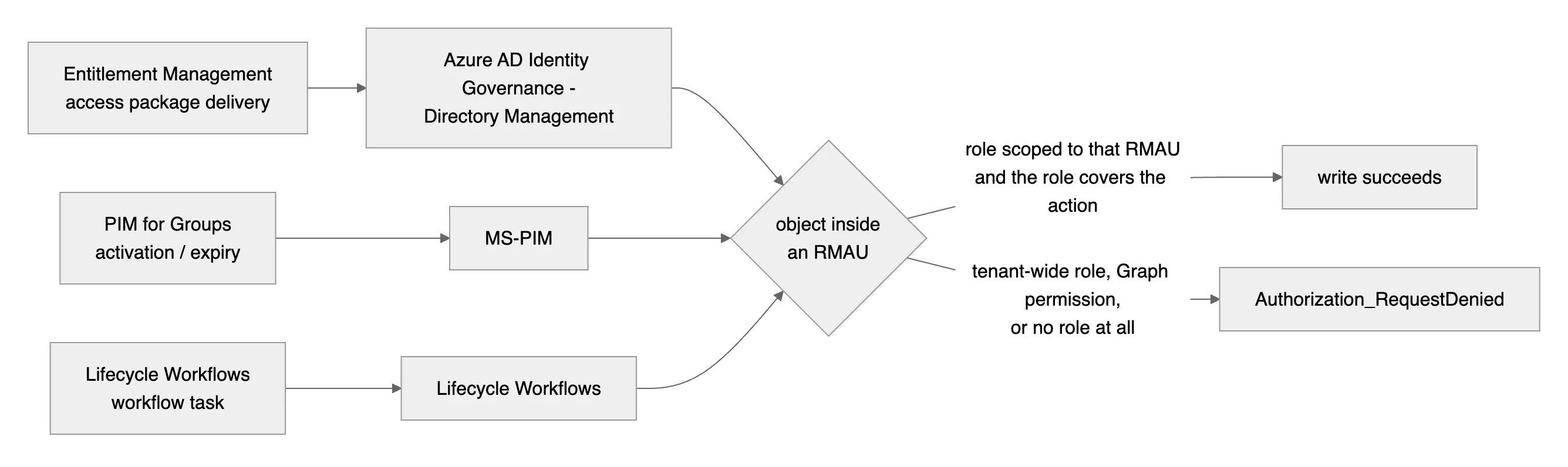
Want to verify the actor in your own tenant? Pull the successful writes by app:
# Who wrote group memberships recently? Look at initiatedBy.app.displayName
az rest --method GET \
  --url "https://graph.microsoft.com/v1.0/auditLogs/directoryAudits?\$filter=activityDisplayName eq 'Add member to group'&\$top=50" \
  --query "value[].{when:activityDateTime, by:initiatedBy.app.displayName, result:result}" -o table
The setup
Everything below was tested live with throwaway objects, using Microsoft Graph (PowerShell Invoke-MgGraphRequest and az rest) plus the portal for the screenshots.
| Piece | Value |
|---|---|
| RMAU | TEST-RMAU-Governance-Demo, isMemberManagementRestricted: true |
| Group | TEST-RMAU-Demo-Group, non-role-assignable security group, inside the RMAU |
| PIM-managed group | PFG-TEST-RMAU-Demo, non-role-assignable, inside the RMAU |
| App | TEST-RMAU-Demo-App + its service principal, both inside the RMAU, with a real app role Demo.User |
| User | TEST-RMAU-Demo-User, inside the RMAU |
| Access packages | one delivering group membership, one delivering the app role, admin direct assignment |
| Starting point | none of the governance service principals holds any role scoped to the RMAU |
Every test follows the same rhythm as the previous post: do the thing, watch it fail, scope exactly one role to exactly one service principal, and watch the same thing succeed.
Groups: Entitlement Management
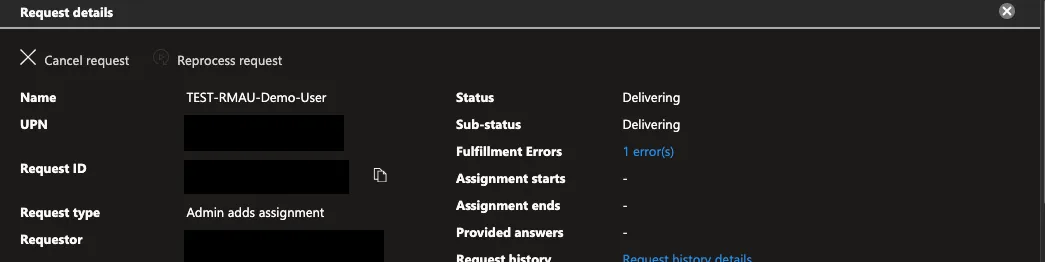
Assign the test user to the access package that delivers membership of the protected group. The request gets approved, moves to Delivering, and stays there:
Open the fulfillment error and there’s the RMAU, wrapped in an Entitlement Management error code:
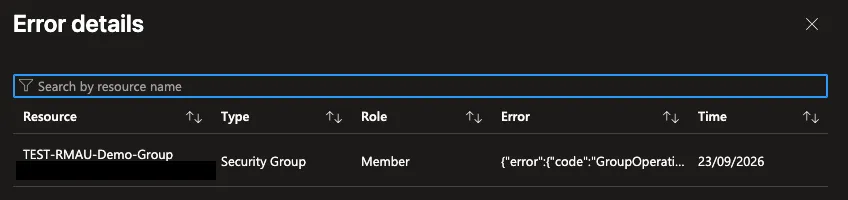
{"error":{"code":"GroupOperationNotAllowed",
 "message":"Insufficient privileges to complete the operation. Target object is a member of a
 restricted management administrative unit and can only be modified by administrators scoped to
 that administrative unit. Check that you are assigned a role that has permission to perform the
 operation for this restricted management administrative unit."}}
Now give Directory Management Groups Administrator, scoped to the groups RMAU:
DM_SP=$(az rest --method GET \
  --url "https://graph.microsoft.com/v1.0/servicePrincipals?\$filter=appId eq 'ec245c98-4a90-40c2-955a-88b727d97151'" \
  --query "value[0].id" -o tsv)

az rest --method POST \
  --url "https://graph.microsoft.com/v1.0/roleManagement/directory/roleAssignments" \
  --body "{
    \"principalId\": \"$DM_SP\",
    \"roleDefinitionId\": \"fdd7a751-b60b-444a-984c-02652fe8fa1c\",
    \"directoryScopeId\": \"/administrativeUnits/<groups-rmau-object-id>\"
  }"
Reprocess the assignment (or wait for Entitlement Management’s own retry), and it lands a couple of minutes after the role:
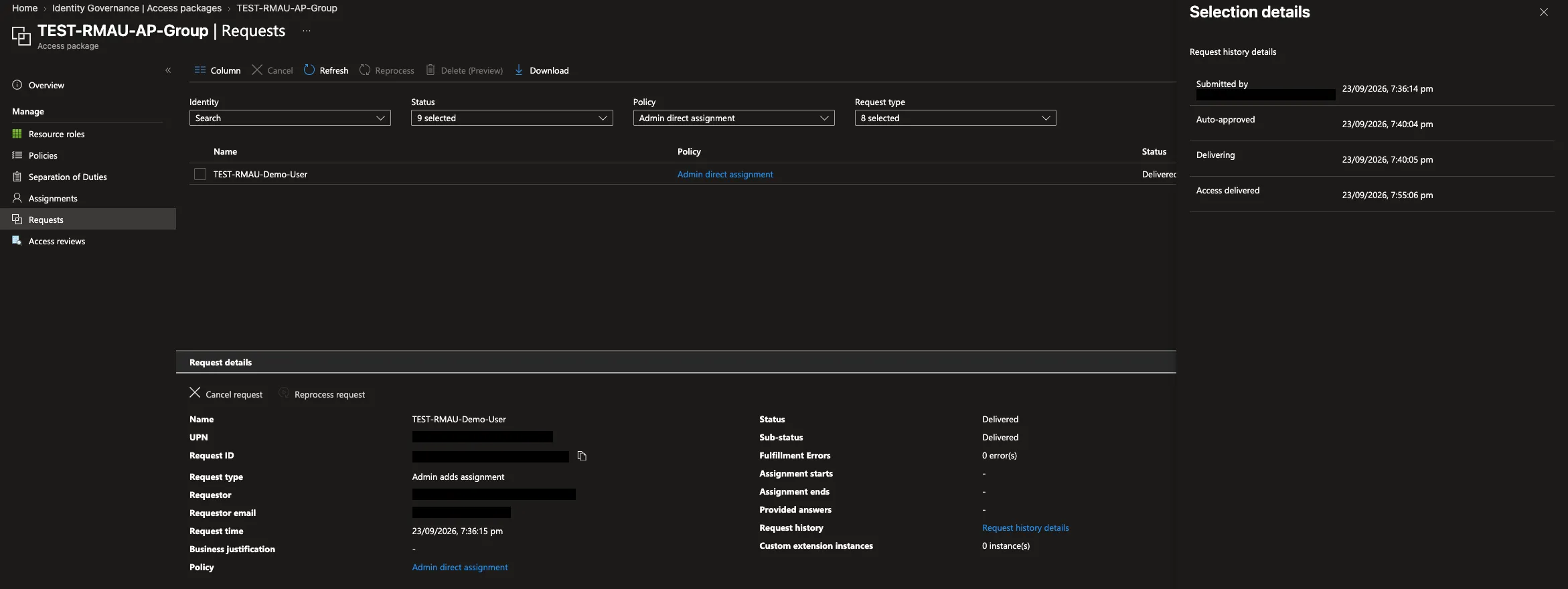
The audit log now has the write, with the actor you’d expect:
Add member to group success Azure AD Identity Governance - Directory ManagementThe tighter option. Groups Administrator is the convenient choice here, and everyone knows what it does. If you’d rather give Directory Management only what it needs, a custom role with a single action is enough for this write:
microsoft.directory/groups.security.assignedMembership/members/updateThat’s the role from the previous post. It can add and remove members of assigned security groups, and nothing else.
Who guards the approvers?
The groups you protect first aren’t always the ones that grant access. An access package for Tier-0 access is only as strong as its approver group. If that group sits outside an RMAU, any tenant-wide Groups Administrator can add themselves as approver and approve their own request, and the whole just-in-time chain quietly becomes self-service.
So in my tenant, every approver, reviewer and manager group for Entitlement Management, and every PIM approver group, lives inside the groups RMAU. Their membership is handed out through an access package too, and that’s exactly the write we just fixed: Entitlement Management adding members to a group inside the RMAU, as Directory Management. Protect the approvers and you’ll need the scoped role on day one.
Applications: Entitlement Management
Same test, but the access package now hands out the Demo User app role on the protected service principal. It stalls in Delivering again, but the error is different:
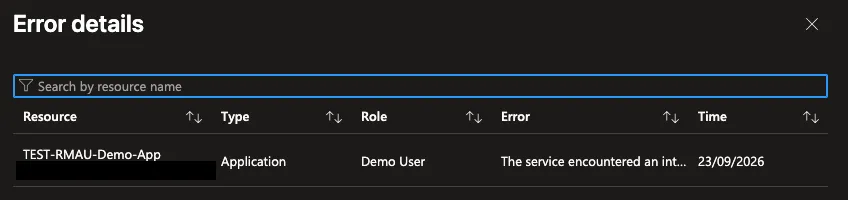
The service encountered an internal error. Please try again later.No mention of the RMAU at all. This is exactly what happened in my own tenant. Users requesting the package for our PIM self-activation client simply weren’t getting the app role, and nothing pointed at the RMAU. I’d scoped Directory Management on the groups RMAU and forgotten the applications RMAU. Once the role was in place, the next Entitlement Management retry cleared the backlog in one burst: sixteen app-role assignments within seven seconds.
Both the app registration and its service principal sit in the RMAU. The previous post explains why you want both: Application.ReadWrite.All can add a credential to either one. But the write that fails here only touches the service principal. Entitlement Management adds an app role assignment on the resource service principal, and the action behind it is microsoft.directory/servicePrincipals/appRoleAssignedTo/update. Application Administrator carries it:
az rest --method POST \
  --url "https://graph.microsoft.com/v1.0/roleManagement/directory/roleAssignments" \
  --body "{
    \"principalId\": \"$DM_SP\",
    \"roleDefinitionId\": \"9b895d92-2cd3-44c7-9d02-a6ac2d5ea5c3\",
    \"directoryScopeId\": \"/administrativeUnits/<apps-rmau-object-id>\"
  }"
Reprocess, Delivered, and the audit log shows Add app role assignment grant to user — success — Azure AD Identity Governance - Directory Management.
One thing to know about this assignment: Application Administrator isn’t on Microsoft’s list of roles that can be assigned with AU scope, and the portal won’t offer it. Graph accepts it and the RMAU enforces it, as covered in the previous post.
PIM for Groups: keep PIM-managed groups out of the RMAU
It’s tempting to put PIM-managed groups in an RMAU: groups onboarded to PIM for Groups, whose members or owners are eligible rather than permanent. A PIM-managed group doesn’t have to be role-assignable, and non-role-assignable ones (for Azure RBAC or application access, say) don’t get the protection the role-assignable flag gives: any tenant-wide Groups Administrator can change their membership. An RMAU would close that. Don’t do it. Here’s why.
Activation works, eligibility doesn’t
With Groups Administrator on the RMAU, MS-PIM can write membership, so activation into a PIM-managed group inside the RMAU works. Without the role it fails, and once the role is on, PIM even retries the pending request by itself. Everything looks fine. That’s the trap.
Eligibility is a different story. Adding a new eligible assignment fails, and so does removing one:
{"error":{"code":"ForbiddenRequest","message":"{\"error\":{\"code\":\"Authorization_RequestDenied\",
 \"message\":\"Insufficient privileges to complete the operation. Target object is a member of a
 restricted management administrative unit and can only be modified by administrators scoped to
 that administrative unit. ...\"}}"}}
I tested a group that was PIM-enabled before it moved into the RMAU and one that wasn’t, directly through the PIM API and through an access package handing out Eligible Member, with MS-PIM, Directory Management and the requesting admin all scoped. I retried after ten minutes and again after nearly twenty. Every attempt failed, the access package ended in DeliveryFailed, and an eligibility that existed before the move could no longer be removed: it’s stuck on the group. An active assignment on the same group, at the same moment, went straight through. This is where Microsoft’s line that PIM doesn’t support groups in RMAUs holds.
Don’t put PIM-managed groups in an RMAU. Activation keeps working, so nothing looks wrong. But the first time you add or remove an eligible assignment it fails, and you don’t want to find that out when someone needs access.
If you test it yourself: PIM first reports the failed request as Granted and only flips it to Failed minutes later. Check for eligibility instances, not the first response.
The design that does work
Keep the PIM-managed group outside the RMAU and make it role-assignable: with the RMAU off the table, that’s the only protection its membership has left. A role-assignable group can only be managed by a Global Administrator, a Privileged Role Administrator or its owners, not by a tenant-wide Groups Administrator. It does count against the limit of 500 role-assignable groups per tenant, so be deliberate about which ones you create.
Then put a delivery group inside the RMAU: a plain, non-role-assignable security group whose only job is to be the PIM-managed group’s eligible member. It has to be eligible: Entra doesn’t allow a group as a regular member of a role-assignable group, but PIM does allow it as an eligible member, and activation adds only the activating user, not the whole group. Entitlement Management then only writes plain membership of the delivery group, which works with the scoped role from the Groups section. MS-PIM only writes the PIM-managed group outside the RMAU, so it needs no role there at all. It’s the delivery-group composition from the previous post; the tests above are why it’s the one to use.

Users: Lifecycle Workflows
Tier-0 admin accounts belong in a users RMAU. The obvious leaver automation for them is a Lifecycle Workflow with a Disable user account task. Run it on demand against the test user and it fails, with the RMAU message as the failure reason:
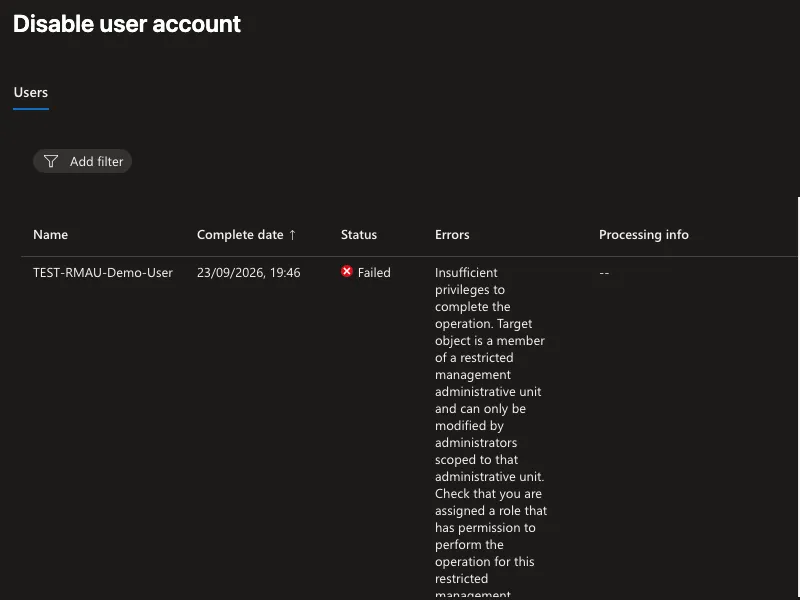
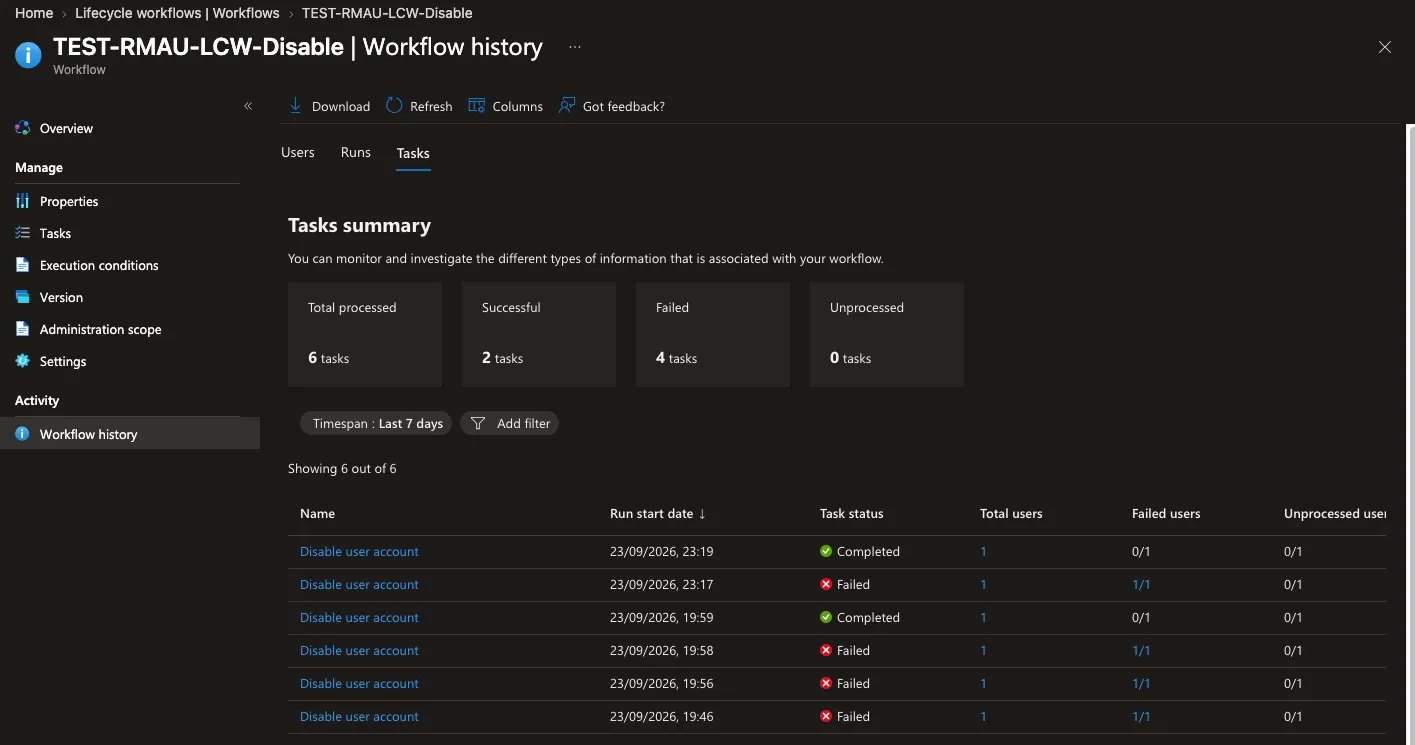
The natural assumption is that Lifecycle Workflows writes through the same Identity Governance service principal as Entitlement Management. So give Directory Management User Administrator on the users RMAU and run it again. Still failed. Two more runs, two more failures. Then look at the audit log for a successful run:
Disable account    success    Lifecycle Workflows
Update user        success    Lifecycle Workflows
Lifecycle Workflows writes as its own service principal, Lifecycle Workflows (ce79fdc4-cd1d-4ea5-8139-e74d7dbe0bb7). Move User Administrator to that one and the next run completes.
Then there’s the catch for actual admin accounts. Give the test user a role that User Administrator isn’t allowed to manage (I used Global Reader) and the same workflow fails again, with the same RMAU message. This time the scope is fine. The role doesn’t cover a privileged target, and the RMAU reports both problems with the same error. Add Privileged Authentication Administrator, scoped to the users RMAU, and it completes. The workflow history tells the whole story:
A custom role isn’t an option: users/disable and users/delete are privileged actions that custom roles can’t hold. (Microsoft also documents that the disable task doesn’t support users with Entra role assignments. With a direct Global Reader assignment it worked, but test it against your own admin accounts first.)
Your Tier-0 admins are probably privileged targets even when they hold no active role. Since 23 September 2026 the PIM for Groups documentation says nobody else can change the credentials of members and owners of a role-assignable group, “including eligible members and owners who haven’t activated yet.” If your admins are eligible members of role-assignable PIM-managed groups, User Administrator alone won’t touch them.
The group tasks need the groups RMAU. Add user to groups and Remove user from selected groups write the group, not the user, again as Lifecycle Workflows. Pointed at a group inside the groups RMAU, both failed with the RMAU error; with Groups Administrator on that RMAU for Lifecycle Workflows, both completed, and the audit log shows Lifecycle Workflows as the actor.
Entitlement Management touches users too. When an external user loses their last access package assignment, Entitlement Management can block their sign-in and later delete them. That write, accountEnabled: false, comes from Directory Management: I saw it in the audit log for a real guest. So if governed guests sit in your users RMAU, Directory Management needs User Administrator there as well. Same users RMAU, two service principals, each for its own process.
Your own identities need it too
The governance service principals are only half of it. Everything that manages these objects needs a scoped role, including the things you run yourself.
Your infrastructure-as-code. The Terraform service principal that creates the groups and maintains the app registrations and their service principals needs Groups, Application and User Administrator scoped to the respective RMAUs. Without them, the next apply against a protected object is a 403.
Your admins. Human admins get the same scoped roles, just in time: a role-assignable PIM-managed group holding, for example, Application Administrator scoped to the applications RMAU, delivered through an access package. The previous post walks through that composition.
And they activate those roles from a Privileged Access Workstation, not from the laptop they read email on. The RMAU protects the objects. It does nothing for the session that holds the role once it’s activated. In Microsoft’s own words, MFA, approvals and role activation “can’t compensate for a compromised workstation.” Enforce it rather than hoping for it: require an authentication context on PIM activation, with a Conditional Access policy that only a PAW device can satisfy.
Sharp edges
Denied writes don’t show up as failed writes. An RMAU refusal isn’t logged as a failed Add member to group. There’s no Core Directory entry for it at all. You’ll find it in Entitlement Management’s request history (Fulfillment errors), in PIM’s own audit category (ForbiddenRequest), or in the Lifecycle Workflow’s history. If your detection only watches Core Directory failures, it won’t see these.
User Administrator is broader than its name. It includes microsoft.directory/groups/members/update and microsoft.directory/servicePrincipals/appRoleAssignedTo/update. If you keep groups, apps and users in one RMAU, the User Administrator you give Lifecycle Workflows also lets it write your protected groups and app role assignments. One RMAU per object type keeps every grant as narrow as its purpose.
“Scoped” isn’t the whole check. The RMAU error also shows up when the role is scoped but doesn’t cover the target, as with a privileged user under User Administrator.
Give it a few minutes. After scoping, Entitlement Management needs a reprocess or its next retry, PIM retries pending requests by itself, and Lifecycle Workflows needs a new run. Everything here landed within one to three minutes.
What a complete setup needs
One RMAU per object type, and a scoped role for every process that writes into it:
| RMAU | Directory Management (Entitlement Management) | MS-PIM | Lifecycle Workflows | Your IaC SP | Your admins (JIT) |
|---|---|---|---|---|---|
| Groups | Groups Administrator (or the one-action custom role) | none: keep PIM-managed groups outside the RMAU | Groups Administrator, if workflows add or remove group members | Groups Administrator | Groups Administrator |
| Applications | Application Administrator | — | — | Application Administrator | Application Administrator |
| Users | User Administrator (+ Privileged Authentication Administrator) for guest lifecycle | — | User Administrator + Privileged Authentication Administrator | User Administrator + Privileged Authentication Administrator | User Administrator |
And keep PIM-managed groups outside the RMAU and role-assignable; put a plain non-role-assignable delivery group inside instead.
The RMAU does exactly what it promises: nothing writes inside it without a role scoped to it. Entitlement Management and Lifecycle Workflows are no exception; give each only the role that covers its own write and they work on your most protected objects too. PIM is the one real exception: its eligibility can’t be written inside an RMAU at all, so PIM-managed groups stay outside.
Sources
- Restricted management administrative units in Microsoft Entra ID, including Limitations and Programmability
- Roles that can be assigned with administrative unit scope
- Assign eligibility for a group in PIM, including the note that PIM doesn’t support groups in RMAUs
- Privileged Identity Management (PIM) for Groups, updated 23 September 2026 to cover eligible members and owners
- Govern access for external users in entitlement management
- Reprocess assignments for an access package
- Lifecycle Workflow built-in tasks
- Microsoft Entra built-in roles: User Administrator
- Configure and secure privileged workstations (PAW)
- Restricted Management AUs in Entra ID: two undocumented paths that actually work, the previous post
Tested in a live tenant against Microsoft Graph with throwaway objects, which were deleted afterwards. Tenant identifiers, object IDs and account names are removed or blacked out. The first-party appIds are the same in every tenant. None of the configurations in this post is generally supported yet (application protection with RMAUs is in private preview at the time of writing); behaviour may change.