Originally published on LinkedIn on 19 May 2026. Reproduced here with light formatting changes.
TL;DR
Restricted Management Administrative Units(isMemberManagementRestricted: true) block any principal without an AU-scoped role from mutating their members. That includes a service principal holdingApplication.ReadWrite.All.- Two configurations the design relies on aren’t on Microsoft’s supported list: applications and their service principals as RMAU members, and
Application Administratorscoped to an AU. Microsoft Graph accepts both. - A third unsupported configuration lets Entitlement Management write to groups inside an RMAU, via a one-action custom role granted at the RMAU scope to the right governance SPs. This is what makes the standard access-package delivery flow work into protected groups.
Any service principal holding Application.ReadWrite.All can mutate every app registration and service principal in your tenant. RMAUs contain that, even when the design relies on two configurations Microsoft’s docs don’t acknowledge.
If your tenant has identities that can’t be tampered with (pipeline service principals, customer-facing OAuth apps, identity-bridge SPs), the rest of this article will be relevant. Everything below is reproducible against your own tenant with az rest.
Scope note: this article is about applications and groups inside RMAUs, not user accounts. Microsoft’s docs lead with the executive-account use case; apps and groups are where the guidance gap is biggest.
⚠️ Disclaimer. The design described in this article is not officially supported by Microsoft. It works in live testing today, but Microsoft’s documentation either doesn’t acknowledge the configurations or lists them as limitations. Either could change without notice.
Where the gaps are: Application Administrator scoped to a Restricted Management AU isn’t on Microsoft’s list of AU-scopable roles, and the portal doesn’t expose it (not in the AU’s roles tab, not in PIM’s AU scope picker). Use Graph.
Entitlement Management is documented as not being able to manage groups inside an RMAU. The workaround later in the article grants one tightly-scoped custom role at the RMAU scope to the right governance service principals.
Verify in your own tenant before you depend on any of this.
Why am I digging into this?
I’m building a greenfield Entra tenant. Greenfield is the rare moment when you can actually aim for the zero-trust posture every company says they want but almost nobody ships.
In brownfield, the answer is always “yes, but”. Yes I’d love that control, but there’s that legacy app, that pipeline, that one consultant, that ten-year-old script no one wants to touch.
I don’t have those constraints yet, so I’m using the runway to figure out which protection mechanisms actually deliver what they promise. Zero trust isn’t something you check off and walk away from. You keep enforcing it, or it stops being true. The earlier you set the bar, the cheaper that gets, because every new app and identity inherits the model rather than being grandfathered around it.
The three findings:
Finding 1: The protection holds against a service principal with Application.ReadWrite.All (the broadest app-write Graph permission you can grant), not just against human admins. Microsoft’s docs describe the enforcement model in general terms (Programmability section) but don’t acknowledge applications or service principals as RMAU members, so the SP-vs-protected-app scenario isn’t covered. Finding 2 is how to still manage those apps without tenant-scoped admin.
Finding 2: Two patterns this design depends on are documented as not-supported but verified to work.
Application Administratorscoped to an AU works, even though it isn’t in Microsoft’s official list of AU-scopable roles and the portal AU and PIM scope pickers don’t surface it. The Graph API accepts the assignment and enforces it correctly. A fresh attacker SP withApplication.ReadWrite.Allplus App Admin @ AU returned HTTP 204 on a PATCH against the RMAU-protected app; the same SP withCloud Device Administrator@ AU (an officially supported role that isn’t app-relevant) returned HTTP 403. So RMAU enforcement evaluates both “is there an AU-scoped role assignment?” and “does that role’s permissions cover this action?”.- Entitlement Management can write membership to a non-role-assignable group inside an RMAU, even though the docs say governance features can’t manage groups inside an RMAU. The trick: grant one tightly-scoped custom role at the RMAU’s scope to the Azure AD Identity Governance - Directory Management SP (and to MS-PIM for the symmetric case where PIM-for-Groups itself manages a group inside the RMAU). In my setup, requesting an access package triggers EM, which adds the user to a non-role-assignable delivery group sitting inside the RMAU. That’s a write any tenant-scoped admin (including GA) gets 403 on. The end-to-end chain is detailed further down; the short version is that the protected-app PATCH returned 204 with my own user after GA was deactivated.
Both observations are consistent with the RMAU “Programmability” guidance, which generically describes “assign a Microsoft Entra role at the scope of the RMAU”. They go beyond what the supported-roles list explicitly covers. Section-by-section evidence is below.
Finding 3: Two undocumented quirks I only stumbled onto by actively probing.
All three findings come out of the same test. The rest of the article walks through it from the setup, through both attack attempts, into the design that keeps the apps manageable without tenant-scoped admin. The errors and screenshots below are from the actual run, not reconstructed.
Setup: a restricted AU protecting one victim app
# Create a restricted-management AU
az rest --method POST \
  --url "https://graph.microsoft.com/v1.0/directory/administrativeUnits" \
  --body '{
    "displayName": "TEST-RestrictedAU-AppProtection",
    "isMemberManagementRestricted": true
  }'
# → 201 Created, RMAU id: <rmau-object-id>

# Create a victim app
az rest --method POST \
  --url "https://graph.microsoft.com/v1.0/applications" \
  --body '{"displayName": "TEST-Victim-ProtectedByAU"}'
# → 201 Created, app oid: <victim-app-object-id>

# Add the victim into the restricted AU
az rest --method POST \
  --url "https://graph.microsoft.com/v1.0/directory/administrativeUnits/<rmau-object-id>/members/\$ref" \
  --body '{"@odata.id": "https://graph.microsoft.com/v1.0/applications/<victim-app-object-id>"}'
# → 204 No Content

# Same flow for the application's service principal (Enterprise Application)
az rest --method POST \
  --url "https://graph.microsoft.com/v1.0/servicePrincipals" \
  --body '{"appId": "<victim-app-app-id>"}'
# → 201 Created, sp oid: <victim-sp-object-id>

az rest --method POST \
  --url "https://graph.microsoft.com/v1.0/directory/administrativeUnits/<rmau-object-id>/members/\$ref" \
  --body '{"@odata.id": "https://graph.microsoft.com/v1.0/servicePrincipals/<victim-sp-object-id>"}'
# → 204 No Content (servicePrincipal isn't on the documented member-types list, but Graph accepts it)
Both the application and its service principal go inside the RMAU. An attacker with Application.ReadWrite.All can add a credential to either object, so the SP needs to be in the RMAU too. Otherwise POST /servicePrincipals/{id}/addPassword is an open path. I ran the same attack matrix against the SP as GA and got 403s on all of them. Application Administrator scoped to the AU enables the same management on the SP as on the application (PATCH calls, addPassword). One asymmetry: description PATCH is exempt on the application (Quirk 1 below), but blocked on the SP.
I’m signed in as a Global Administrator at tenant scope, with no AU-scoped assignment.
Attack 1. Global Admin tries to weaponize the protected app
# Add a federated identity credential pointing at an attacker-controlled issuer
az rest --method POST \
  --url ".../applications/<victim-app-object-id>/federatedIdentityCredentials" \
  --body '{"name":"evil-fic","issuer":"https://evil.example.com","subject":"attacker",
           "audiences":["api://AzureADTokenExchange"]}'
Result:
ERROR: Forbidden (Authorization_RequestDenied)
"Target object is a member of a restricted management administrative unit
 and can only be modified by administrators scoped to that administrative
 unit."
Same 403 for addPassword, PATCH displayName, PATCH redirectUris, PATCH requiredResourceAccess, and even DELETE of the app. As a Global Administrator I cannot touch this object.
The portal surfaces the same restriction explicitly on the app’s Overview page:
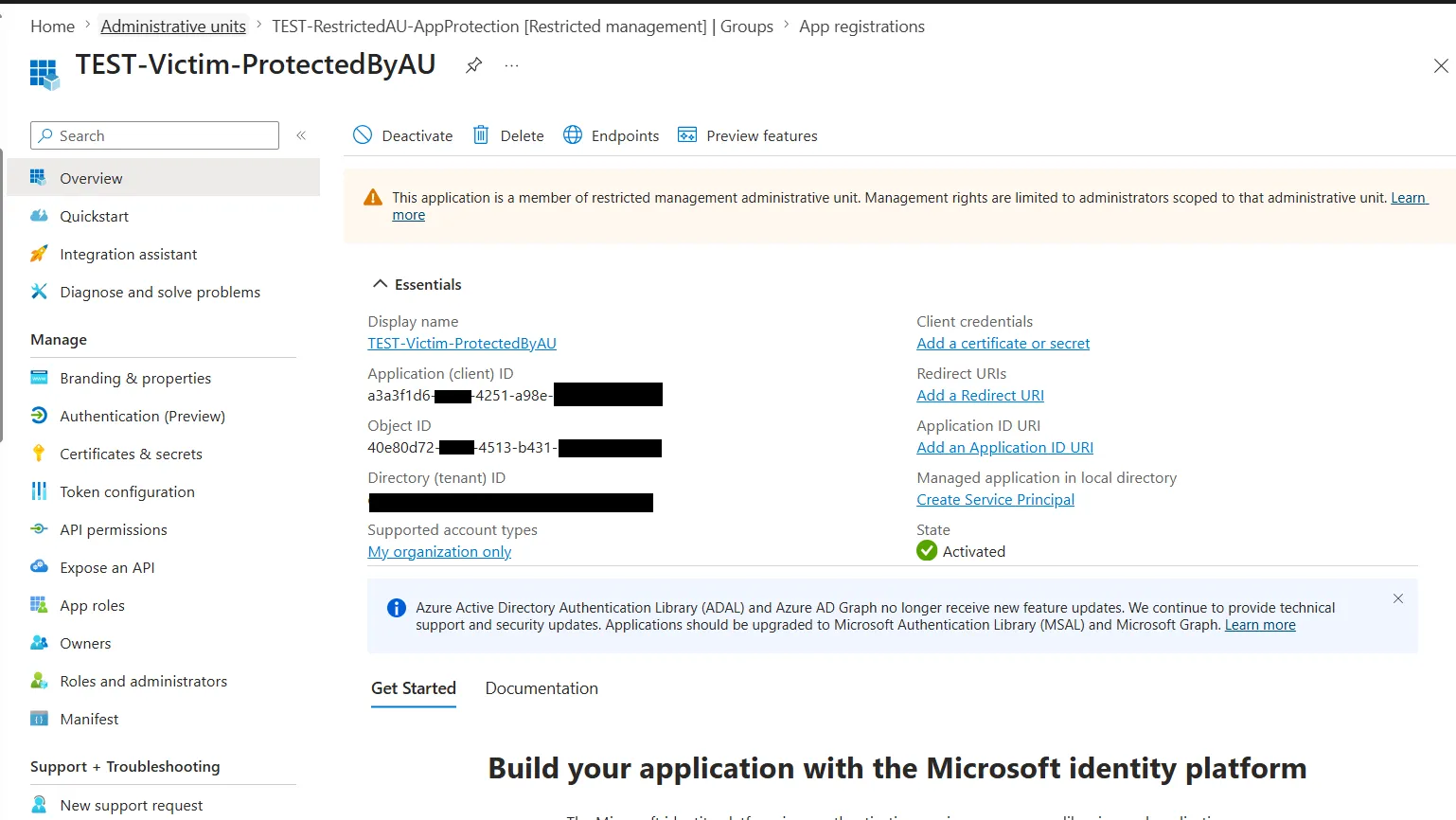
The banner reads: “This application is a member of restricted management administrative unit. Management rights are limited to administrators scoped to that administrative unit.”
Attack 2. A service principal with Application.ReadWrite.All
The juicier scenario. I created a separate “attacker” app, granted it Application.ReadWrite.All with admin consent, and authenticated as that SP:
az login --service-principal -u <attacker-app-id> -p <attacker-app-secret> --tenant <tenant-id>

# Sanity: the SP CAN list applications, so its perm is effective
az rest --method GET --url ".../applications?\$top=1&\$select=displayName"
# → 200 OK, "TEST-Victim-ProtectedByAU"

# But: try to write to the protected victim
az rest --method POST \
  --url ".../applications/<victim-app-object-id>/federatedIdentityCredentials" \
  --body '{"name":"evil-fic", ...}'
Result:
ERROR: Forbidden (Authorization_RequestDenied)
"Target object is a member of a restricted management administrative unit ..."
So a compromised service principal holding the broadest possible app-write permission still gets a 403 against the protected target. The Graph permission alone isn’t enough. The principal needs an explicit role at the AU scope to do anything.
The “happy path”: AU-scoped admin succeeds
Next I assigned the attacker SP the Application Administrator role, scoped to the restricted AU:
az rest --method POST \
  --url "https://graph.microsoft.com/v1.0/roleManagement/directory/roleAssignments" \
  --body '{
    "@odata.type":"#microsoft.graph.unifiedRoleAssignment",
    "principalId":"<attacker-sp-object-id>",
    "roleDefinitionId":"9b895d92-2cd3-44c7-9d02-a6ac2d5ea5c3",
    "directoryScopeId":"/administrativeUnits/<rmau-object-id>"
  }'
# → 201 Created
Same SP, same token, same Graph permission. The previously-403’d FIC POST now returns:
{ "id": "cccccccc-cccc-cccc-cccc-cccccccccccc",
  "name": "test-fic-via-scoped-admin" }
PATCH calls succeed too. The protection is scope-driven, not permission-driven. The only way in is an explicit AU-scoped role assignment, and that assignment is itself auditable. I revisit the same mechanism with a role-assignable group as the principal in How the App Admin role lands on the PIM-for-Group further down. It’s the foundation of both the workaround and the recommended composition.
Two undocumented quirks
1. description PATCH is exempt from the restriction. While running the test I noticed PATCH description did succeed at tenant scope, even though every other PATCH and POST returned 403. I couldn’t find this exemption listed anywhere in the docs. My guess is the description field is treated as low-impact metadata. No security implication on the practical attack paths (FIC, secret, displayName, permissions are all still locked). Note this if you audit on description changes. The exemption is on the application object only. On the servicePrincipal, description is locked like everything else.
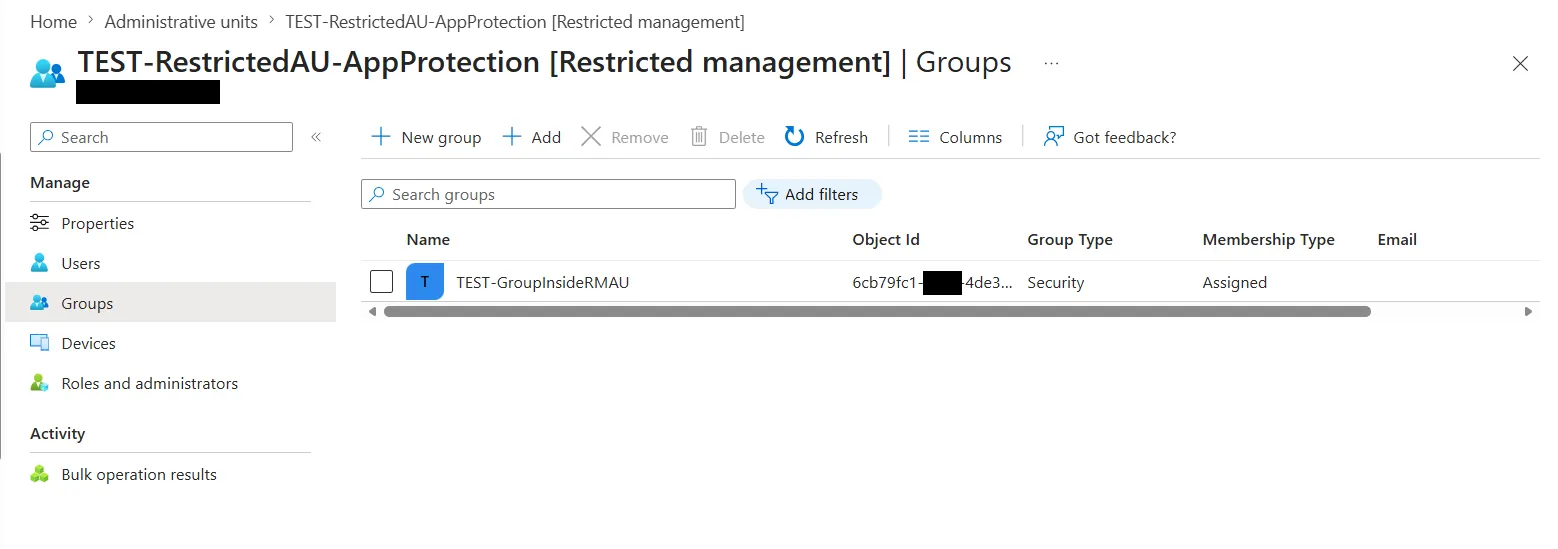
2. The Entra portal’s AU Members tab doesn’t display applications or service principals, even though the v1.0 Graph API fully treats both as members. If you’ve added an app or SP to an AU and don’t see it in the portal, don’t assume the API call failed. Verify with:
# Application members
az rest --method GET \
  --url "https://graph.microsoft.com/v1.0/directory/administrativeUnits/<rmau-object-id>/members/microsoft.graph.application" \
  --query "value[].{name:displayName, id:id, appId:appId}"

# Service principal members
az rest --method GET \
  --url "https://graph.microsoft.com/v1.0/directory/administrativeUnits/<rmau-object-id>/members/microsoft.graph.servicePrincipal" \
  --query "value[].{name:displayName, id:id, appId:appId}"
The application (or SP) is a member. The portal UI just hasn’t been updated to surface either type. The protection is still visible in other places: the app’s own Overview page shows the restricted-AU banner (see screenshot above), and any attempt to edit Authentication, Certificates & secrets, or Display name returns the same error.
For contrast, groups do render in the AU’s Groups tab. Only applications and service principals are hidden:
Caveats worth a paragraph in any design doc
isMemberManagementRestrictedis immutable at AU creation.- Deletion order matters. You can’t just delete a populated RMAU. Remove member objects from the RMAU first (apps, groups, devices, users), THEN delete the RMAU. If you skip the removal step, even after the RMAU itself is gone the former members retain their “protected” tag for up to ~30 minutes, during which neither the contained objects nor a recreated AU can fully clean them up. To unstick a stuck orphan: recreate an RMAU, re-add the orphan, self-assign an AU-scoped role, remove the orphan from the AU, then delete it. Member removal requires Global Admin or Privileged Role Admin (neither can be assigned at AU scope).
- Break-glass: Global Admin and Privileged Role Admin can self-assign at the restricted AU scope. The action is auditable but not blocked. So this is defense-in-depth against accidents, lateral movement, and over-broad apps. It’s not a wall against a determined GA.
- Per the docs, groups inside a restricted AU can’t be managed by Microsoft Entra ID Governance (PIM, Entitlement Management, Lifecycle, Access Reviews). The supported design is therefore to keep the role-assignable group outside the AU and only the protected apps inside. See the next section for an unofficial workaround that lets you put both inside.
Unofficial workaround: putting the delivery group inside the RMAU too
Before going further, two distinct groups are involved here. The confusion this section invites if you skim is “one group is App Admin”, which would be impossible (non-role-assignable groups can’t be Entra role assignment principals). They’re separate objects with separate jobs:
-
PIM-for-Group (call it
pim-rmau-AppAdmins). Role-assignable (isAssignableToRole=true), PIM-managed, lives outside the RMAU. This is the group that actually holds the activeApplication Administratorrole assignment, scoped to the RMAU. It’s a normal, supported, role-assignable group setup. The role assignment is what gives anyone who becomes a member of this group the App Admin permissions over the apps inside the RMAU. -
Delivery group (call it
mgmt-AzurePipelineSPs-Operators). Non-role-assignable, lives inside the RMAU as a member. Holds no Entra role itself. Its only job is to be an eligible member ofpim-rmau-AppAdminsin PIM-for-Groups, and to be the resource role given out by the access package.
How the App Admin role lands on the PIM-for-Group
The PIM-for-Group is just an ordinary role-assignable group, and Application Administrator sits on it through the same mechanism used in “Attack 1, the happy path” earlier in this article. One POST to /roleManagement/directory/roleAssignments. The only difference from the SP example: principalId is the group’s object id instead of an SP’s.
az rest --method POST \
  --url "https://graph.microsoft.com/v1.0/roleManagement/directory/roleAssignments" \
  --body '{
    "@odata.type": "#microsoft.graph.unifiedRoleAssignment",
    "principalId": "<pim-for-group-object-id>",
    "roleDefinitionId": "9b895d92-2cd3-44c7-9d02-a6ac2d5ea5c3",
    "directoryScopeId": "/administrativeUnits/<rmau-object-id>"
  }'
# → 201 Created
Verified live by listing the role assignments scoped to that RMAU:
az rest --method GET \
  --url "https://graph.microsoft.com/v1.0/roleManagement/directory/roleAssignments?\$filter=directoryScopeId eq '/administrativeUnits/<rmau-object-id>'"
{
"principalId": "<pim-for-group-object-id>",
"roleDefinitionId": "9b895d92-2cd3-44c7-9d02-a6ac2d5ea5c3",
"directoryScopeId": "/administrativeUnits/<rmau-object-id>"
}Where 9b895d92-2cd3-44c7-9d02-a6ac2d5ea5c3 is the Application Administrator role’s well-known id. There is no special “PIM-for-Group role assignment” object. The group is the principal of an ordinary AU-scoped Entra role assignment, exactly like an SP would be. Anyone who PIM-activates membership in the group inherits Application Administrator at the RMAU scope for the activation window.
Application Administrator does not appear in the AU’s “Roles and administrators” tab. It’s also missing from PIM → Microsoft Entra roles → Application Administrator → Add active assignment → Scope type = “Administrative Unit” (no AU is offered as a scope). That’s because Microsoft’s official list of roles that can be assigned with administrative unit scope does not include Application Administrator. The RMAU Programmability section only describes the general mechanism (“assign a Microsoft Entra role to the application at the scope of the restricted management administrative unit”) and links to that same list.
The Graph API accepts the POST (201 Created) and I verified the assignment is functionally effective: a fresh attacker SP with only Application.ReadWrite.All and Application Administrator scoped to the RMAU returned HTTP 204 on PATCH /applications/{victim} (where {victim} is in the RMAU). The same attacker SP with the same app permission but Cloud Device Administrator @ AU instead (a role that is on the documented supported list but isn’t relevant to apps) returned HTTP 403. So RMAU enforcement evaluates both “is there an AU-scoped role assignment?” and “does that role’s permissions cover this action?”.
So the portal scope picker reflects the supported-roles list. Graph reflects what enforcement actually checks. For applications they don’t agree, and only the Graph path is open. That’s what this design uses.
The PIM portal IS useful after the assignment exists: the role-assignable group’s “Assigned roles → Active assignments” tab shows the App Admin row with the RMAU as scope (see screenshot below).
The activation window length, MFA-on-activation, justification, ticket number, and approval flow are all controlled by the PIM policy on the group itself (PIM → Microsoft Entra roles → Settings on the group, or via Graph on groupAssignmentScheduleRequests policy). Tighten these to taste.
Activation flow
- User requests the access package → gets membership in the delivery group inside the RMAU.
- Membership in the delivery group makes them transitively eligible for the PIM-for-Group (because the delivery group is the eligible member of it).
- User goes to
entra.microsoft.com→ ID Governance → PIM → My roles → Groups → activates membership inpim-rmau-AppAdmins. - PIM activation makes that single user a temporary active member of the PIM-for-Group (only that user, not the whole delivery group; PIM-for-Groups specifically handles group-as-eligible-member by activating per-user).
- While the activation window is open, the user has
Application Administratorscoped to the RMAU and can manage the apps inside it. - Activation expires → user is removed from the PIM-for-Group → access goes away.
What this buys you over the supported pattern (where you just put users directly as eligible members of the PIM-for-Group via the access package):
- The delivery group sits in the RMAU, so its membership is protected from tenant-scoped Groups Administrator and similar. The PIM-for-Group itself doesn’t need to be in the RMAU because
isAssignableToRole=truealready gives it the equivalent membership-modification restriction. - The delivery group is non-role-assignable, which doesn’t consume a slot against the 500-role-assignable-groups-per-tenant cap. Useful if you have a lot of these.
It also adds a layer of indirection that the cleaner supported pattern doesn’t have. Which is why the recommended composition later in this article is still the direct path (user eligible on the PIM-for-Group via access package, no separate delivery group). See “Recommended composition” below for the trade-off.
Visualizing the two-group flow:
   Access Package → grants membership in →
       │
       ▼
   ┌────────────────────────────────────────────────┐
   │ Restricted Management AU                       │
   │                                                │
   │   Members:                                     │
   │      ├─ sp-pipeline-A                          │
   │      ├─ sp-pipeline-B                          │
   │      └─ mgmt-AzurePipelineSPs-Operators        │
   │           (non-role-assignable delivery group) │
   └────────────────────────────────────────────────┘
       │
       │ this delivery group is the ELIGIBLE member of:
       ▼
   pim-rmau-AppAdmins   (role-assignable, PIM-managed, outside the RMAU)
       │
       │ ACTIVE role assignment, scoped to the RMAU above:
       │     Application Administrator
       │
   [ User activates via PIM → temporary member of pim-rmau-AppAdmins
     → has App Admin on the apps inside the RMAU ]
Both ends of that chain are visible in the portal. The role-assignable PIM-for-Group holds the active Application Administrator assignment, scoped to the RMAU:
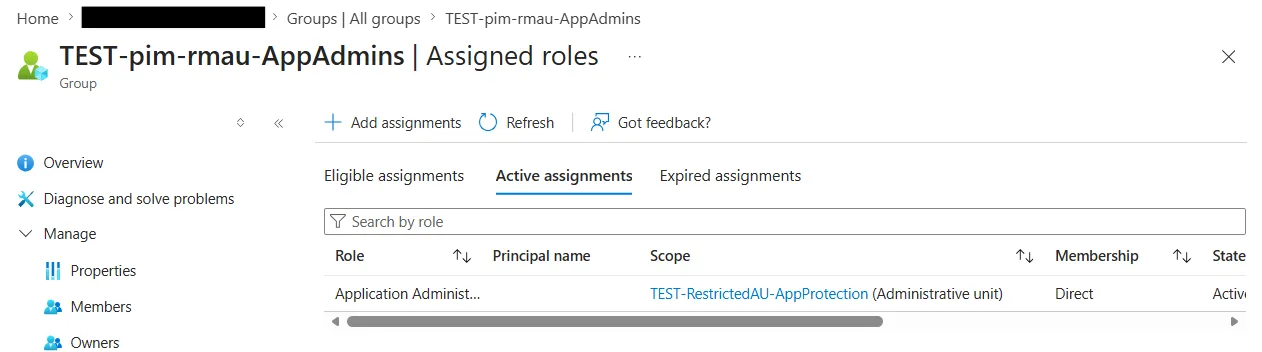
pim-rmau-AppAdmins → Assigned roles → Active assignments. The Application Administrator row’s scope column points at TEST-RestrictedAU-AppProtection. This is the standard, supported half of the design: a role-assignable group holding an AU-scoped role.
And the non-role-assignable delivery group (which lives inside the RMAU) is the eligible member of that PIM-for-Group:
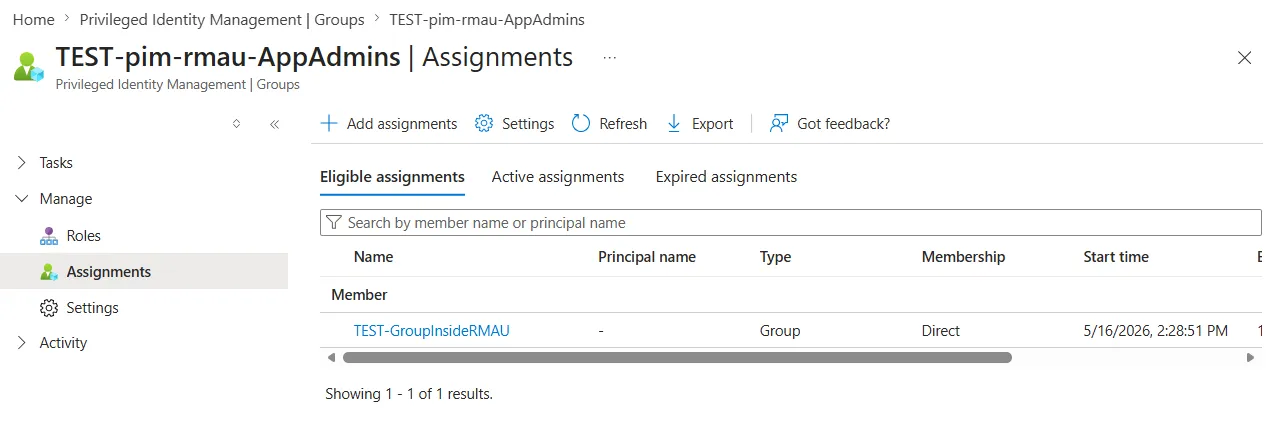
pim-rmau-AppAdmins → Members → Eligible. The principal is the non-role-assignable delivery group from inside the RMAU. When a user gets membership in the delivery group via the access package, they inherit eligibility on the PIM-for-Group and can activate per-user.
End-to-end test
I added my own user account as a member of the delivery group inside the RMAU, deactivated my Global Administrator role, PIM-activated pim-rmau-AppAdmins, and ran a PATCH /applications/<victim-app-object-id> against the protected app inside the RMAU:
HTTP 204 No ContentRead-back showed the displayName was updated. The only way that 204 lands without GA is the chain I just described: delivery group inside RMAU → eligible on the PIM-for-Group → PIM activation makes me a temporary active member → I inherit Application Administrator scoped to the RMAU → RMAU enforcement passes → PATCH succeeds. The same PATCH before activation: 403. From a fresh attacker SP holding Application.ReadWrite.All: 403. Same SP again with Cloud Device Administrator at the AU scope (a supported role, but irrelevant to apps): also 403. It only succeeds when both conditions hold: the principal has an AU-scoped role assignment, AND that role grants the requested action.
Letting EM and PIM write inside the RMAU
Update: I’ve since tested Entitlement Management, PIM for Groups and Lifecycle Workflows inside an RMAU end to end: Restricted Management AUs in Entra ID break Entitlement Management and PIM. Here’s how to fix it. The short version: don’t put PIM-managed groups in an RMAU. Activation into a group inside the RMAU works once MS-PIM holds Groups Administrator scoped to it, but eligibility can’t be added or removed on a group inside an RMAU, even with every service principal scoped. So step 5 of the dry-run further down doesn’t work as written, and MS-PIM doesn’t need the custom role below. The delivery-group design in this post is unaffected: there the PIM-managed group itself stays outside the RMAU.
The reason this composition isn’t on Microsoft’s supported list is that Entitlement Management and PIM normally can’t manage groups inside a restricted-management AU. Here’s why it works anyway: when Entitlement Management adds or removes a member of a group, it doesn’t act as itself. It issues a regular Microsoft Graph call through the first-party Azure AD Identity Governance - Directory Management SP (appId ec245c98-4a90-40c2-955a-88b727d97151). PIM-for-Groups activations follow the same pattern through the MS-PIM SP. If you grant those two SPs a single tightly-scoped permission at the RMAU’s scope, the Graph call that fails for everyone else succeeds for them.
The custom role I built has exactly one allowed action:
microsoft.directory/groups.security.assignedMembership/members/updateThat’s the entire permission. It can add and remove members on assigned-membership security groups inside the RMAU. It cannot rename, delete, change ownership, or modify any other property of the group. I named it CR-RMAU-Group-Membership-Manager and assigned it at the RMAU’s scope to the two governance SPs:
Azure AD Identity Governance - Directory Managementso Entitlement Management’s existing membership writes succeed.MS-PIMso PIM-for-Groups activations succeed.
That’s the whole trick. No SDK shim, no custom service, no scheduled job rewriting state. Microsoft’s governance services do exactly what they would have done anyway. The only difference is that the standard Graph call lands in a scope where it now has explicit permission. Tenant-scoped Groups Administrator and even Global Administrator still get a 403 if they try to edit the same group.
1. Create the custom role (run as Privileged Role Administrator):
az rest --method POST \
  --url "https://graph.microsoft.com/v1.0/roleManagement/directory/roleDefinitions" \
  --body '{
    "displayName": "CR-RMAU-Group-Membership-Manager",
    "description": "Add/remove members on assigned-membership security groups inside a Restricted Management Administrative Unit.",
    "isEnabled": true,
    "resourceScopes": ["/"],
    "rolePermissions": [
      {
        "allowedResourceActions": [
          "microsoft.directory/groups.security.assignedMembership/members/update"
        ]
      }
    ]
  }'
2. Look up the two first-party SPs that govern Entitlement Management and PIM-for-Groups writes. Their appId is well-known and identical across every tenant:
# Azure AD Identity Governance - Directory Management
# (Entitlement Management writes group membership through this SP)
DM_SP=$(az rest --method GET \
  --url "https://graph.microsoft.com/v1.0/servicePrincipals?\$filter=appId eq 'ec245c98-4a90-40c2-955a-88b727d97151'" \
  --query "value[0].id" -o tsv)

# MS-PIM (PIM-for-Groups activations write through this SP)
PIM_SP=$(az rest --method GET \
  --url "https://graph.microsoft.com/v1.0/servicePrincipals?\$filter=displayName eq 'MS-PIM'" \
  --query "value[0].id" -o tsv)
3. Assign the custom role at the RMAU scope to both SPs:
for PRINCIPAL in $DM_SP $PIM_SP; do
  az rest --method POST \
    --url "https://graph.microsoft.com/v1.0/roleManagement/directory/roleAssignments" \
    --body "{
      \"@odata.type\": \"#microsoft.graph.unifiedRoleAssignment\",
      \"principalId\": \"$PRINCIPAL\",
      \"roleDefinitionId\": \"<custom-role-object-id-from-step-1>\",
      \"directoryScopeId\": \"/administrativeUnits/<rmau-object-id>\"
    }"
done
Portal view: Entra admin center → Roles & admins → All custom roles → open CR-RMAU-Group-Membership-Manager → Assignments tab. Filter by your RMAU. You should see the two SPs listed:
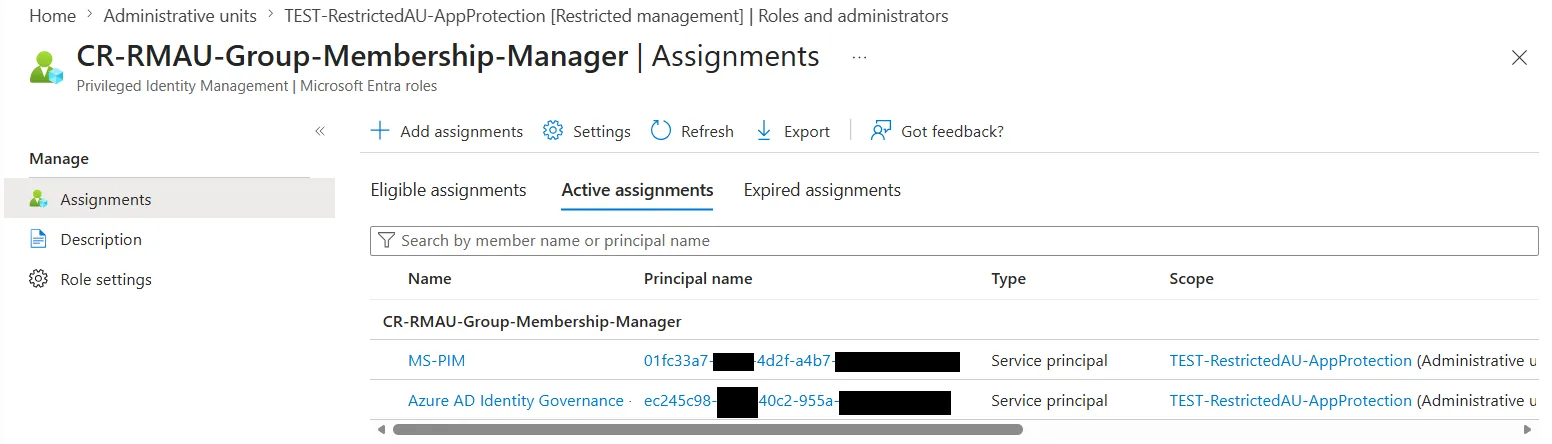
Both first-party governance SPs hold the custom role, scoped to the RMAU. Note the Scope column points back to the AU itself.
Verify it landed:
az rest --method GET \
  --url "https://graph.microsoft.com/v1.0/roleManagement/directory/roleAssignments?\$filter=directoryScopeId eq '/administrativeUnits/<rmau-object-id>'" \
  --query "value[].{principal:principalId, role:roleDefinitionId, scope:directoryScopeId}"
Real output from the tenant where I tested:
[
  {
    "principal": "aaaaaaaa-aaaa-aaaa-aaaa-aaaaaaaaaaaa", // Directory Management SP
    "role": "<custom-role-object-id>", // CR-RMAU-Group-Membership-Manager
    "scope": "/administrativeUnits/<rmau-object-id>"
  },
  {
    "principal": "bbbbbbbb-bbbb-bbbb-bbbb-bbbbbbbbbbbb", // MS-PIM
    "role": "<custom-role-object-id>",
    "scope": "/administrativeUnits/<rmau-object-id>"
  }
]
Negative control
Confirm the group inside the RMAU is still protected from tenant admins:
# Create a non-role-assignable security group, add it to the RMAU, then as Global Admin:
az rest --method POST \
  --url "https://graph.microsoft.com/v1.0/groups/<group-id>/members/\$ref" \
  --body '{"@odata.id": "https://graph.microsoft.com/v1.0/directoryObjects/<my-user-oid>"}'
ERROR: Forbidden (Authorization_RequestDenied)
"Target object is a member of a restricted management administrative unit
and can only be modified by administrators scoped to that administrative
unit."The RMAU is still doing its job on the group itself. Only the two Entra-Governance SPs you delegated to can now mutate its membership.
Functional dry-run
(Worth doing in a non-prod tenant before you trust it.)
- Create an Access Package in Entitlement Management that grants the group as a resource role.
- Create an Assignment Policy on the package that allows your test user to request access.
- As the test user, request the package. Approve the request as the policy reviewer.
- Watch Entitlement Management add the user to the group inside the RMAU. The write happens through the Directory Management SP using the custom role you assigned, not the tenant-scoped Groups Administrator role.
- Repeat with PIM-for-Groups. Enable PIM on the group, assign your test user as Eligible, then activate from
entra.microsoft.com → ID Governance → PIM → My roles → Groups. The activation write goes through MS-PIM using the same custom role.
If either step fails with Authorization_RequestDenied, double-check the custom role’s allowed action is exactly microsoft.directory/groups.security.assignedMembership/members/update and that both SPs have the role at the RMAU scope.
Why a non-role-assignable group works (and why that matters)
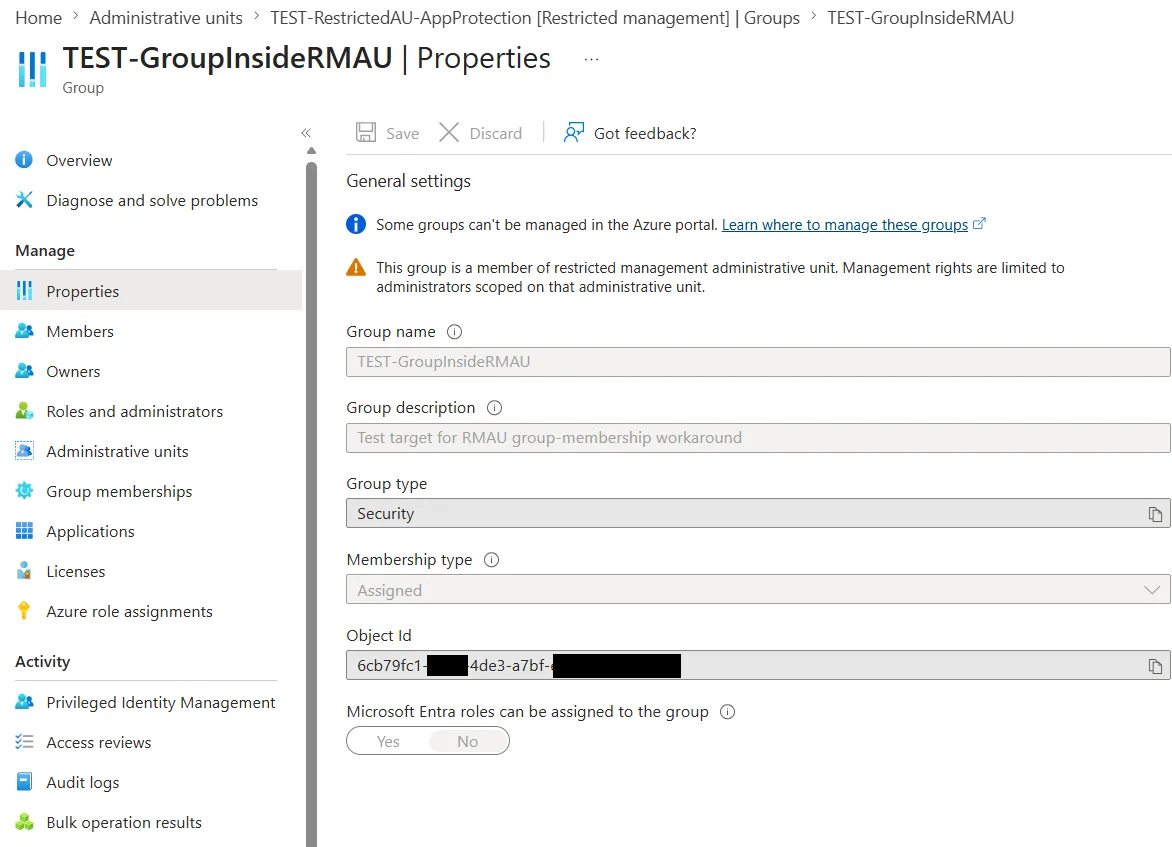
The role-assignable property on a group exists for one reason. It restricts who can change membership to Privileged Role Admin and Global Admin only. The regular Groups Administrator role doesn’t apply. An RMAU provides the same membership-protection guarantee, just at the AU scope. So when the group is inside the RMAU, you don’t need the role-assignable property to keep the membership safe. The RMAU is the protection.
This matters because role-assignable groups are capped at 500 per tenant (service limits). That’s a hard limit you can’t raise. Keeping these JIT-delegation groups non-role-assignable inside RMAUs preserves that budget for the things that genuinely need it.
Here’s the test group’s Properties page. The restricted-AU banner is at the top, and the “Microsoft Entra roles can be assigned to the group: No” toggle is at the bottom. PIM-managed, protected, doesn’t consume a role-assignable group slot:
The recommended composition (clean and simple)
Deliver PIM-for-Groups eligibility directly via the access package. Two reasons this is the preferred shape:
- No extra group to plumb together. Entitlement Management can assign eligible group membership in one step (docs). You don’t need a separate “request group” that some workflow then promotes to PIM eligibility. The access package IS the eligibility-grant mechanism. You don’t end up with parallel objects describing the same grant.
- Full audit visibility in one place. When you open the access package, you see exactly what a requesting user is being granted. Which group, with what role membership type (eligible vs active), under what approval policy. Access reviews and request history both key off that same package, instead of being scattered across PIM and EM. If you split eligibility into a separate PIM configuration adjacent to but not inside the access package, you’ve split the audit story across two systems. “What does this user actually get?” becomes a multi-click question instead of a single screen.
That single composition covers the full lifecycle from access-request through expiry. Everything else in this article is mechanics underneath that pattern. The RMAU keeps the protected apps safe from tenant-scoped admins. The PIM-for-Group, sitting outside the RMAU, is role-assignable and holds the active Application Administrator role assignment scoped to the RMAU (same roleAssignments POST shown in How the App Admin role lands on the PIM-for-Group above, with principalId = the group’s object id and directoryScopeId = the RMAU). Users get eligible membership on that group directly via the access package, then activate when they need it. No separate delivery group, no custom role.
For pipeline and automation SPs holding RBAC on your Azure subscriptions, the kind that would hand attackers your whole landing zone if backdoored:
   Access Package (Entitlement Management)
            │  grants ELIGIBLE membership on the PIM-for-Group
            ▼
   pim-rmau-AppAdmins   (role-assignable, PIM-managed, outside the RMAU)
            │
            │ ACTIVE role assignment, directoryScopeId = the RMAU below:
            │      Application Administrator
            ▼
   ┌────────────────────────────────────────────────────┐
   │ Restricted Management AU                           │
   │                                                    │
   │   Members:                                         │
   │      ├─ sp-pipeline-A                              │
   │      └─ sp-pipeline-B                              │
   └────────────────────────────────────────────────────┘

   [ User activates via PIM → temporary member of pim-rmau-AppAdmins
     → has Application Administrator on the apps inside the RMAU,
     for the activation window ]
End-to-end: request access package, wait for approval, activate group membership via PIM, get App Admin scoped only to those specific SPs for the next N hours, window expires, you’re back to baseline. No standing access. No backdoor path via tenant App Admin. No backdoor path via a compromised app-perm holder either.
Bottom line
The Microsoft docs are right about the core protection. RMAUs are stronger than the average operator assumes, particularly against a service principal holding the broadest possible Graph application permissions. If your tenant has any apps that can’t be tampered with (pipeline SPs, customer-facing OAuth apps, identity-bridge SPs), putting them in a restricted-management AU with JIT-delegated admin is a meaningful improvement over standard least-privilege.
The design relies on two patterns that aren’t on Microsoft’s supported list but work, both tested in this article:
- Application Administrator scoped to an AU. Microsoft doesn’t list it as AU-scopable and the portal won’t let you assign it that way, but Graph accepts the assignment and the RMAU runtime enforces it.
- Entitlement Management writing membership to a non-role-assignable group inside an RMAU. Documented as not-supported, but works when you grant a one-action custom role at the RMAU scope to the Directory Management SP (and to MS-PIM for the symmetric case).
The recommended shape stays clean: access package → PIM-for-Group eligibility → App Admin scoped to the RMAU. The delivery-group variant is there for the niche where you want both halves protected and are willing to own the unsupported parts. Until Microsoft either documents these paths or removes them, treat them as foundational to the design but confirm the behavior in your own tenant before relying on it.
📚 References:
- Restricted management administrative units in Microsoft Entra ID
- Assign roles with administrative unit scope
- Use groups to manage role assignments in Microsoft Entra ID (role-assignable groups concept + cap)
- PIM for Groups: configure activation settings
- PIM for Groups + Access Packages
- Conditional Access authentication context (force fresh sign-in for elevation)